Anonymous
Mar 25, 2026
Rating: 5/5
Best intro to embedded systems
As a computer science student, this was the perfect bridge between software coding and hardware interaction. Highly recommended for university projects.
Description
Reviews
| Brand | - |
| Category | Robotics / STEM Teaching Tools / Development, Learning, Evaluation & Industrial Control Boards |
| Origin | - |
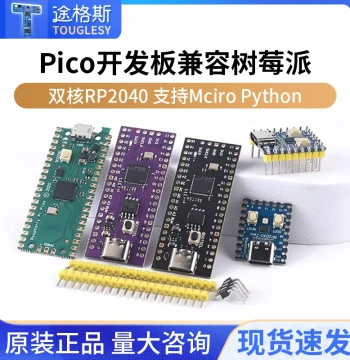
| Microcontroller | RP2040 designed by Raspberry Pi |
| CPU Architecture | Dual-core Arm Cortex-M0+ |
| Clock Speed | Up to 133 MHz |
| Flash Memory | 2MB on-board QSPI |
| SRAM | 264KB internal |
| GPIO Pins | 26 multi-function pins |
| Programming Languages | MicroPython, C, C++ |
| USB Interface | USB 1.1 with device and host support |
| Operating Voltage | 1.8V to 5.5V |
| Board Dimensions | 51mm x 21mm |
Anonymous
Mar 25, 2026
Rating: 5/5
Best intro to embedded systems
As a computer science student, this was the perfect bridge between software coding and hardware interaction. Highly recommended for university projects.
Anonymous
Mar 23, 2026
Rating: 5/5
Perfect for beginners!
This kit is exactly what I needed to start learning MicroPython. The documentation is clear, and the board works flawlessly right out of the box.
Anonymous
Mar 15, 2026
Rating: 5/5
Excellent for prototyping
I've used this for several IoT projects now. The dual-core processor handles multitasking well, and the community support is huge.
Anonymous
Mar 15, 2026
Rating: 5/5
Powerful little board
Don't let the size fool you; this thing packs a punch. The PIO state machines are a game changer for custom peripheral control.
Anonymous
Mar 07, 2026
Rating: 4/5
Fun family project
Bought this to teach my kids about coding. It's robust enough to handle some clumsy wiring, and the examples are easy to follow.
Anonymous
Mar 03, 2026
Rating: 4/5
Great value but needs extra cables
The Pico itself is amazing and very powerful for the price. Just note that you might need to buy a micro-USB cable separately if you don't have one lying around.
Q: Can I power this with a 3.7V LiPo battery?
A: Yes, the RP2040 chip supports an input voltage range of 1.8V to 5.5V, so a standard 3.7V LiPo battery is perfectly safe to use directly on the VBUS or VSYS pin.
Q: Does this kit include a USB cable?
A: This specific introductory kit typically includes the board and a header pin strip, but please check the package contents list as USB cables are sometimes sold separately depending on the vendor bundle.
Q: How do I install MicroPython on this?
A: It's very simple: hold the BOOTSEL button while connecting the board to your computer via USB. It will appear as a flash drive. Just drag and drop the MicroPython UF2 file onto it, and it will reboot automatically.
Q: What is the maximum current output per GPIO pin?
A: Each GPIO pin can safely source or sink up to 4mA, with a total limit across all pins to ensure the chip operates within thermal specifications. For higher current loads, we recommend using external transistors or drivers.
Q: Is this compatible with Arduino IDE?
A: Absolutely! You can program the Raspberry Pi Pico using the Arduino IDE by installing the appropriate RP2040 board manager package.