Anonymous
Mar 29, 2026
Rating: 5/5
Best board for university projects
Used this for my final year engineering project. The ability to drag and drop UF2 files makes flashing firmware incredibly easy. Highly recommended for students.
Description
Reviews
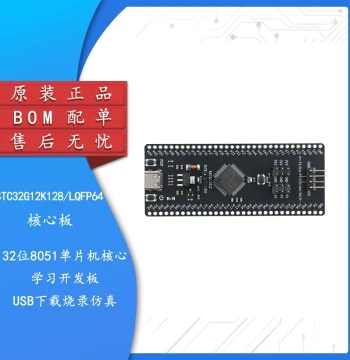
| Brand | - |
| Category | Robotics / STEM Teaching Tools / Development, Learning, Evaluation & Industrial Control Boards |
| Origin | - |
| Processor | Dual-core ARM Cortex-M0+ RP2040 |
| Clock Speed | Up to 133 MHz |
| Flash Memory | 2 MB on-board QSPI flash |
| SRAM | 264 KB internal SRAM |
| GPIO Pins | 26 multi-function GPIO pins |
| Programming Languages | MicroPython, CircuitPython, C, C++ |
| USB Interface | USB 1.1 Host and Device support |
| ADC Channels | 3 x 12-bit ADC channels |
| Operating Voltage | 1.8V to 5.5V input range |
| Dimensions | 51mm x 21mm |
Anonymous
Mar 29, 2026
Rating: 5/5
Best board for university projects
Used this for my final year engineering project. The ability to drag and drop UF2 files makes flashing firmware incredibly easy. Highly recommended for students.
Anonymous
Mar 28, 2026
Rating: 4/5
Great hardware, minor learning curve
Hardware is solid and robust. If you are coming from Arduino, the workflow is slightly different but worth learning. No built-in WiFi though, which I knew beforehand.
Anonymous
Mar 26, 2026
Rating: 5/5
Perfect for beginners and pros alike
The RP2040 chip is incredibly powerful for the price. Setting up MicroPython was seamless, and the documentation is top-notch. Great for learning embedded systems.
Anonymous
Mar 26, 2026
Rating: 5/5
Reliable and fast
Runs my sensor data logging script without any hiccups. The power efficiency is impressive when running on battery power.
Anonymous
Mar 22, 2026
Rating: 4/5
Solid choice for prototyping
Very happy with the performance. The only downside is that it doesn't have headers pre-soldered, so you need to do that yourself or buy a version with them.
Anonymous
Mar 19, 2026
Rating: 5/5
Excellent value development board
I've used this for several home automation projects. The dual-core processing handles multitasking well, and the pinout is very flexible.
Q: Is this compatible with Arduino IDE?
A: Yes, the RP2040 is supported by the Arduino IDE. You will need to install the appropriate board manager package to get started.
Q: Does this board come with pre-soldered header pins?
A: No, this standard version of the Raspberry Pi Pico comes without header pins soldered. You will need to solder them yourself or purchase a variant that includes them.
Q: Can I power this board via the USB port alone?
A: Yes, the board can be powered directly via the micro-USB port. It regulates the 5V input down to the required operating voltage for the RP2040 chip.
Q: Does this board have built-in Wi-Fi or Bluetooth?
A: No, the standard Raspberry Pi Pico does not have built-in wireless connectivity. However, you can add Wi-Fi and Bluetooth capabilities using the Raspberry Pi Pico W variant or external modules.
Q: What is the maximum current draw per GPIO pin?
A: Each GPIO pin can safely source or sink up to 4mA, with a total limit for all IO banks. Please refer to the official datasheet for detailed electrical characteristics.