Anonymous
Mar 29, 2026
Rating: 5/5
Robust and reliable
I've used this board in three different industrial control prototypes now. It handles noise well and the GPIO flexibility is outstanding. The build quality feels solid despite the low cost.
Description
Reviews
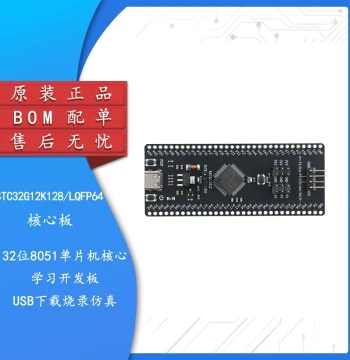
| Brand | - |
| Category | Robotics / STEM Teaching Tools / Development, Learning, Evaluation & Industrial Control Boards |
| Origin | - |
| Processor | RP2040 Microcontroller (Dual-core ARM Cortex-M0+) |
| Clock Speed | Up to 133 MHz |
| Flash Memory | 16 MB On-board QSPI Flash |
| SRAM | 264 KB |
| GPIO Pins | 26 Multi-function GPIO pins |
| Connectivity | USB 1.1 Device and Host support |
| Programming Languages | MicroPython, CircuitPython, C, C++ |
| Power Supply | 5V DC via USB-C connector |
| Dimensions | 51mm x 21mm |
| Operating Temperature | -20°C to +85°C |
Anonymous
Mar 29, 2026
Rating: 5/5
Robust and reliable
I've used this board in three different industrial control prototypes now. It handles noise well and the GPIO flexibility is outstanding. The build quality feels solid despite the low cost.
Anonymous
Mar 26, 2026
Rating: 5/5
Perfect for embedded projects
This CM0 kit is exactly what I needed for my home automation sensors. The RP2040 chip is incredibly efficient, and the documentation made getting started with MicroPython a breeze. Highly recommended for beginners and pros alike.
Anonymous
Mar 25, 2026
Rating: 5/5
Exceeded expectations
The speed and memory allocation are impressive for an M0+ core. I ported a legacy C project to this board in a weekend. The USB-C power delivery is also a nice modern touch.
Anonymous
Mar 18, 2026
Rating: 4/5
Solid choice for IoT nodes
Works great as a standalone microcontroller. I wish it had built-in WiFi like the Pico W, but for wired sensor networks or where you add your own radio module, this is unbeatable for the price.
Anonymous
Mar 14, 2026
Rating: 4/5
Great value, minor learning curve
Excellent hardware for the price point. The low power consumption is real; my battery-powered project has been running for weeks. It took me a little while to configure the PIO state machines, but the community forums were very helpful.
Anonymous
Mar 04, 2026
Rating: 5/5
Best board for learning ARM
As a computer engineering student, this was the perfect platform to understand embedded ARM architecture without breaking the bank. The dual-core processing allows for some really interesting multitasking experiments.
Q: Does this board support Arduino IDE?
A: Yes, the RP2040 microcontroller on this kit is fully supported by the Arduino IDE. You can install the Raspberry Pi Pico board package and start coding immediately.
Q: Can I power this board with a 3.7V LiPo battery directly?
A: No, this board requires a regulated 5V input via the USB-C port. If you wish to use a LiPo battery, you must use a boost converter to step the voltage up to 5V first.
Q: Is there a debugger interface included on the board?
A: The board supports SWD (Serial Wire Debug) via specific GPIO pins, but it does not have an onboard debug probe. You will need an external debugger like the Raspberry Pi Debug Probe or a J-Link.

Q: What is the maximum current draw per GPIO pin?
A: Each GPIO pin can safely source or sink up to 4mA. The total current drawn by all GPIO pins combined should not exceed 50mA to ensure stable operation.
Q: How do I enter bootloader mode to flash new firmware?
A: To enter bootloader mode, hold down the BOOTSEL button while connecting the board to your computer via USB. It will appear as a mass storage device where you can drag and drop your .uf2 file.