Anonymous
Apr 03, 2026
Rating: 5/5
Perfect Upgrade
Much faster than the original Pico. Great for my sensor projects and the Wi-Fi range is impressive.
Description
Reviews
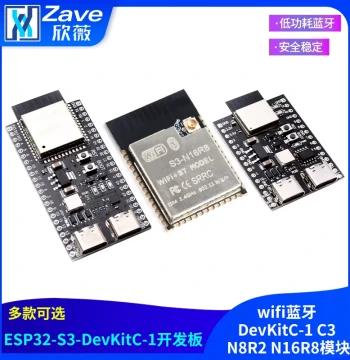
| Brand | - |
| Category | Electronic Components / Maker DIY / Development Boards & Control Boards |
| Origin | - |
| Microcontroller | Dual-Core RP2350 |
| CPU Architecture | Arm Cortex-M33 |
| Max Clock Speed | 150 MHz |
| Wireless Connectivity | 802.11n Wi-Fi |
| Onboard Flash | 4MB QSPI |
| SRAM | 520KB |
| GPIO Pins | 26 Multi-function Pins |
| Input Voltage | 1.8V to 5.5V |
| Dimensions | 51mm x 21mm |
| USB Interface | Micro USB 1.1 |
Anonymous
Apr 03, 2026
Rating: 5/5
Perfect Upgrade
Much faster than the original Pico. Great for my sensor projects and the Wi-Fi range is impressive.
Anonymous
Mar 10, 2026
Rating: 4/5
Great Value
Solid board for the price. Documentation could be slightly clearer for beginners but overall very satisfied.
Anonymous
Mar 03, 2026
Rating: 5/5
Excellent Wi-Fi Performance
The connectivity is stable and setup was straightforward using MicroPython. Great upgrade from the original Pico.
Anonymous
Feb 01, 2026
Rating: 5/5
Easy to Learn
Used this for my university project. Works with Thonny IDE perfectly and community support is huge.
Anonymous
Jan 27, 2026
Rating: 5/5
Reliable Connection
No dropouts during testing. Power consumption is reasonable for always-on IoT applications.
Q: Is this compatible with Pico W libraries?
A: Most libraries are compatible, but please check RP2350 specific documentation for any changes.
Q: Is soldering required?
A: Headers are not included, so soldering is needed for breadboard use unless you buy a pre-soldered version.
Q: Does it support Bluetooth?
A: This W model focuses on Wi-Fi connectivity. Please check the H model for Bluetooth features.
Q: What is the current limit?
A: Recommended max draw is 500mA via USB. External power sources should be regulated.
Q: Can I power it with 3.3V directly?
A: Yes, you can power it via the 3.3V OUT pin in reverse, but ensure stable voltage.