Anonymous
Mar 31, 2026
Rating: 5/5
Reliable and stable
Has been running 24/7 for three months without a single crash. Audio quality is clear on both incoming and outgoing calls. Highly recommend for businesses needing compliance recording.

Description
Reviews
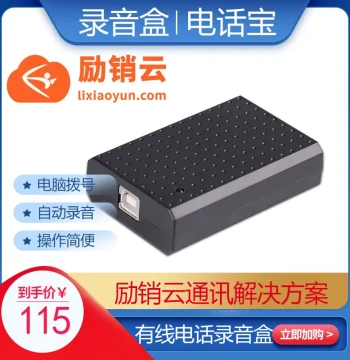
| Brand | - |
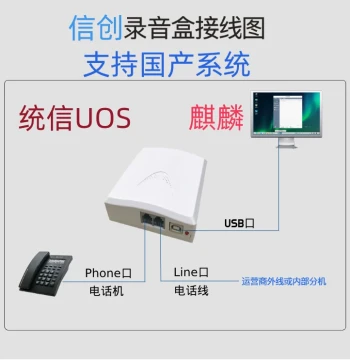
| Category | Office Equipment, Supplies & Services / Phone Recording Devices |
| Origin | - |
| Connectivity Interface | USB 2.0 |
| Supported Lines | 2 Analog Telephone Lines |
| Caller ID Protocol | FSK/DTMF Compatible |
| Recording Format | WAV, MP3 (Configurable) |
| Software Feature | PC Pop-up Screen on Incoming Call |
| Development Kit | 248-Line Secondary Development API Included |
| Power Supply | USB Bus Powered |
| Operating System Support | Windows 10/11, Linux |
| Storage Method | Direct to PC Hard Drive |
| Package Contents | Recording Box, USB Cable, RJ11 Cables, SDK CD |
Anonymous
Mar 31, 2026
Rating: 5/5
Reliable and stable
Has been running 24/7 for three months without a single crash. Audio quality is clear on both incoming and outgoing calls. Highly recommend for businesses needing compliance recording.
Anonymous
Mar 30, 2026
Rating: 3/5
Works well but driver installation was tricky
The hardware itself is fine and records clearly. However, getting the drivers recognized on Windows 11 took some troubleshooting with support. Once installed, it works smoothly.
Anonymous
Mar 29, 2026
Rating: 4/5
Great SDK for custom apps
Bought this specifically for the 248-line development kit. The documentation is decent, and I was able to integrate call logging into our internal CRM within a few days. Deducting one star because the sample code could be more commented.
Anonymous
Mar 26, 2026
Rating: 4/5
Good value for dual-line recording
Setup was straightforward. The USB power means no extra power bricks cluttering the desk. The software interface looks a bit dated, but functionality is solid.
Anonymous
Mar 18, 2026
Rating: 5/5
Perfect for our small office integration
We needed a reliable way to record two lines and display caller info on our receptionist's PC. This device worked out of the box with the provided software. The pop-up screen is instant and very helpful.
Anonymous
Mar 12, 2026
Rating: 5/5
Exactly what we needed
Simple plug-and-play for basic recording, but powerful enough if you want to customize it later. The caller ID accuracy is 100% so far with our VoIP adapter.
Q: Is the SDK compatible with Python or only C++?
A: The primary SDK is provided in C++, but since it uses standard DLL calls, many customers have successfully created wrappers to use it with Python, C#, and Java.
Q: Does it record both sides of the conversation automatically?
A: Yes, the device automatically records both the inbound and outbound audio channels for both supported lines without requiring any additional configuration.
Q: Can I access the recordings remotely?
A: The device saves files directly to the connected PC's hard drive. To access them remotely, you would need to set up file sharing on the PC or use third-party remote desktop software.
Q: What happens if the PC goes to sleep?
A: If the host PC enters sleep mode, recording will stop. We recommend configuring your PC's power settings to 'Never Sleep' while the recording software is running to ensure continuous coverage.
Q: Does this device work with VoIP phone systems?
A: This device is designed for analog telephone lines. If your VoIP system has an analog telephone adapter (ATA) with FXS ports, you can connect the Zipei box to those ports to record calls.